 forms.app
Performance Evaluation Form Template
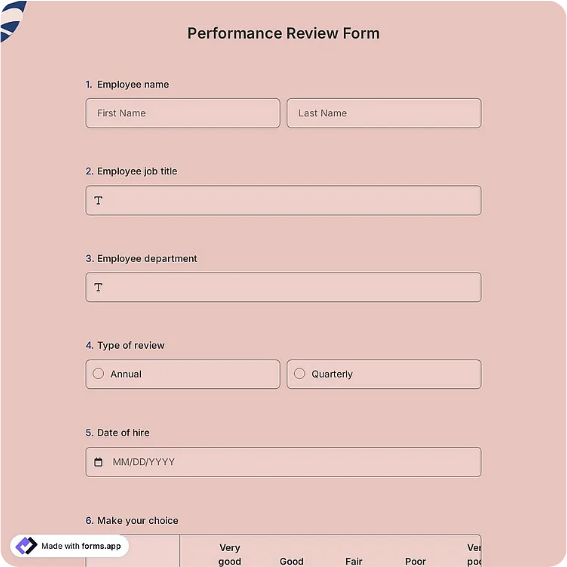
Employee performance evaluation form with 1-5 rating table, goals, comments, and signatures.
Available online on
Download as
- Free PDF and Word downloads for offline use
- Fillable fields you can customize for your business
- Share a link or print copies for in-person sign-ups
- Ready-made online forms on popular form builders
Last updated July 17, 2026. Reviewed by the Online Form Templates team.
About this template
A Performance Evaluation Form turns an annual review from a wandering conversation into a documented assessment both sides can reference later. The core is a rating table scoring criteria like quality of work, productivity, communication, teamwork, reliability, and initiative on a 1-5 scale, framed by employee and reviewer details, a review period, space for strengths and areas to improve, goals for the next period, and signatures from both parties. HR teams, small business owners, and department managers use the same skeleton whether reviews happen annually or quarterly.
The written record matters as much as the meeting. Raises, promotions, and, when it comes to that, terminations all stand on firmer ground when scores and comments were captured consistently over time rather than reconstructed from memory.
How teams use this form day to day
Most managers complete the rating table before the review meeting, then walk through it with the employee section by section, adjusting notes where the conversation adds context. Some organizations have employees self-score on a second copy first; the gaps between self-ratings and manager ratings are usually where the most useful discussion lives. After both parties sign, HR files the form, and the goals section becomes the opening agenda of the next review.
Quarterly shops keep it lighter, scoring only four or five criteria, but keep the criteria identical across quarters so a slipping score is visible as a trend, not an impression.
Customize fields and branding
Edit the Word master to rename criteria for the role; a warehouse review might swap communication for safety compliance, while a sales review adds quota attainment. Add your company name and review-period options, and define the scale in writing on the form itself, for example that 3 means meets expectations, so a generous rater and a strict one mean the same thing by a 4. The online version can average scores automatically and store every cycle in one spreadsheet.
Resist the urge to add criteria until the table needs two pages. Six to eight well-chosen rows produce better conversations than fifteen vague ones.
Common mistakes to avoid
Central tendency is the classic: every employee scores 3 on everything, and the form becomes noise. Anchoring each number with a one-line definition helps, as does requiring a comment for any 1, 2, or 5. Second, do not let the goals section stay empty; a review that only grades the past wastes half its value. Third, never skip the employee signature, which confirms the review happened and was seen, not necessarily agreed with; add a comment line for disagreements instead.
Example scenario
A 15-person marketing agency runs annual reviews each January. The account director scores a coordinator 4s across most rows but a 2 on reliability, citing three missed internal deadlines in the comments. The conversation surfaces that two deadlines collided with a client emergency nobody escalated. The goals section captures the fix, a weekly workload check-in, and both sign. At the next review, reliability is back to a 4, and the signed forms document the whole arc for the raise discussion.
Choosing PDF, Word, or online
The fillable PDF suits in-person reviews where a printed sheet keeps the meeting focused and the signatures are ink. The Word file is for HR teams that tailor criteria per department and reprint each cycle. The online form fits remote teams and multi-manager rollups, tallying scores without transcription. Whichever format you use, store completed evaluations in one place per employee, because their value compounds only when cycles can be compared.
Typical fields
- Employee name
- Job title / department
- Reviewer name
- Review period
- Rating table: quality, productivity, communication, teamwork, reliability, initiative (1-5)
- Overall rating
- Key strengths
- Areas for improvement
- Goals for next period
- Employee and reviewer signatures
Best for
- Annual and quarterly employee reviews
- Probation-period assessments
- Raise and promotion documentation
- Small business HR record keeping
When to use PDF vs online
Use the PDF or Word download for in-person sign-ups, fax, or email attachments. Choose an online form when you need automatic notifications, payment integrations, or a shareable link for customers.