 forms.app
Training Evaluation Form Template
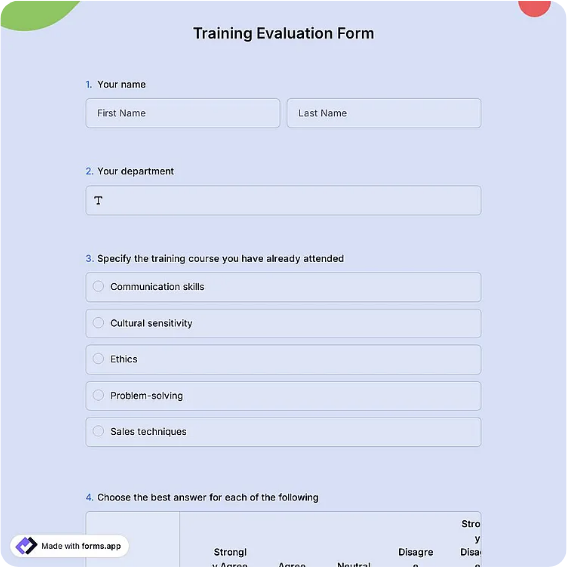
Post-training feedback form rating content, trainer, materials, and pacing with open comments.
Available online on
Download as
- Free PDF and Word downloads for offline use
- Fillable fields you can customize for your business
- Share a link or print copies for in-person sign-ups
- Ready-made online forms on popular form builders
Last updated July 17, 2026. Reviewed by the Online Form Templates team.
About this template
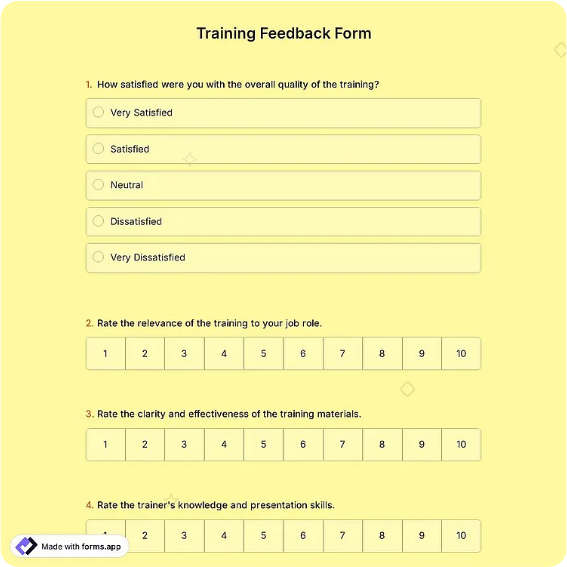
A Training Evaluation Form is the sheet handed out in the last ten minutes of a workshop that tells you whether the session was worth running again. It typically collects the participant's name (often optional), the course title, trainer, and date, then rates content relevance, trainer knowledge, presentation clarity, materials quality, pacing, and venue or platform on a 1-5 scale, before asking what was most useful, what should change, and whether the participant would recommend the session. HR teams, corporate trainers, safety officers, and workshop facilitators all rely on it.
Collected consistently, these forms do two jobs: they improve the next session, and they justify the training budget with numbers instead of anecdotes.
How teams use this form day to day
The standard rhythm is to distribute the form before the final exercise, not after it, so completion happens while attendees are still seated. Trainers tally the ratings the same afternoon: an average below 3 on pacing usually means the agenda was overloaded, while low scores on materials point to slides or handouts rather than delivery. The open-ended answers get skimmed for repeated phrases; when four participants independently mention wanting more hands-on practice, that is next quarter's agenda change.
L&D coordinators who run recurring programs archive the tallies per course. A trainer whose clarity scores climb over three cohorts has evidence for their own review; a course whose relevance scores sag is due for a content refresh, whoever teaches it.
Customize fields and branding
In the Word master, set the course and trainer names as prefilled headers when you print for a specific session, and adjust criteria to the format: an e-learning module might rate platform usability instead of venue comfort. Many teams add a would-recommend line as a simple loyalty signal across all courses. If anonymity improves candor in your culture, delete the name field entirely. The online version shines for virtual training, sending the link in the closing slide and charting averages automatically.
Keep it to one page. Response rates fall off sharply once a feedback form turns over, and a half-completed evaluation skews every average.
Common mistakes to avoid
The biggest mistake is emailing the form the next day, which drops completion dramatically and biases responses toward the annoyed and the delighted. Capture feedback in the room or on the call. Second, avoid double-barreled criteria like content and delivery in one row, since a 3 there tells you nothing. Third, do not skip the open questions; the ratings say how the session went, but the comments say why.
Example scenario
A safety officer runs quarterly forklift refresher training for a warehouse crew. The June session scores 4.6 on trainer knowledge but 2.8 on pacing, and five comment fields mention that the regulations section dragged. For September, the officer moves regulations to a pre-read handout and doubles the practical time. Pacing rebounds to 4.2, and the two evaluation summaries go into the annual safety compliance file as proof the program is monitored and improved.
Choosing PDF, Word, or online
Use the printable PDF for in-person sessions, where paper in the room beats a follow-up email for response rate. Keep the Word version as your master so course names, criteria, and branding update in minutes between programs. Use the hosted online form for webinars and remote cohorts, where a link on the final slide collects scores before the meeting ends and the averages calculate themselves. Mixed programs often print for classroom days and link for virtual ones, then combine tallies per course.
Typical fields
- Participant name (optional)
- Course / session title
- Trainer name
- Training date
- Rating table: content relevance, trainer knowledge, presentation clarity, materials, pacing, venue/platform (1-5)
- Most useful part of the session
- Suggested improvements
- Would you recommend this training?
- Overall rating
Best for
- Corporate workshops and onboarding sessions
- Safety and compliance refresher training
- Webinars and virtual course feedback
- Conference session and seminar reviews
When to use PDF vs online
Use the PDF or Word download for in-person sign-ups, fax, or email attachments. Choose an online form when you need automatic notifications, payment integrations, or a shareable link for customers.