 forms.app
Event Planning Form Template
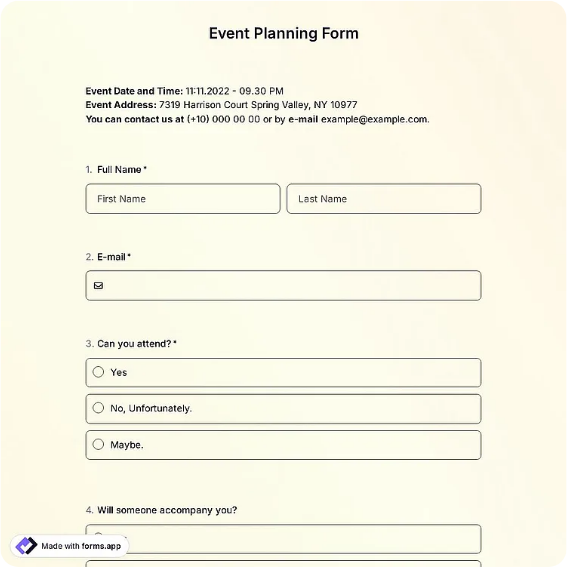
Client intake worksheet for event logistics: date, venue, guest count, budget, catering, and vendors.
Available online on
Download as
- Free PDF and Word downloads for offline use
- Fillable fields you can customize for your business
- Share a link or print copies for in-person sign-ups
- Ready-made online forms on popular form builders
Last updated July 17, 2026. Reviewed by the Online Form Templates team.
About this template
An Event Planning Form gives event planners, venue coordinators, and corporate event teams a single intake worksheet that turns a first conversation into a workable brief. Client intake worksheet for event logistics: date, venue, guest count, budget, catering, and vendors.
Instead of scribbled consultation notes, every event starts with the same structured sheet. Common fields include client or host name, phone / email, event type, event date and time, venue or location, expected guest count, budget range, catering and menu notes, vendors needed, and special requests. That covers planner client intake, venue booking coordination, corporate event teams, and party rental companies quoting a package.
How teams use this form day to day
Planners fill the form in live during the consultation call or hand it across the table at a walkthrough, checking off vendor categories — catering, AV, florals, photography — as the client talks. By the end of the meeting the brief is done, the client has confirmed it with a signature, and the quote can reference the sheet line by line instead of reconstructing the conversation from memory.
Venue coordinators use the same layout as a booking record: one form per event in the calendar binder, so whoever works the day of the event can read guest count, setup time, and vendor arrivals without calling the salesperson who booked it. The budget range field also sets expectations early, filtering a champagne request from a lemonade budget before anyone drafts a proposal.
Customize fields and branding
Edit the Word download to add your company header and tune the vendor checklist to what you actually offer — a rental company might swap photography for tents, tables, and linens, while a corporate team adds registration and badging. If you charge by headcount tiers, print your tier breaks next to the guest count field so the client sees pricing implications while choosing a number.
For repeat corporate clients, save a pre-filled copy with their standing preferences and only update the date, headcount, and budget each quarter. The consultation shrinks to fifteen minutes.
Common mistakes to avoid
The classic gap is capturing the event date but not the setup and teardown window, which is what actually books the venue and the crew. Second, an open budget conversation without a written range on the form leads to proposals nobody can accept; make the client commit to a bracket. Third, do not leave vendors as a blank line — a checklist forces the who-books-what conversation, so the DJ does not fall between the planner and the client.
Example scenario
A planner meets a couple about a 90-guest anniversary party. During the hour she fills one form: garden venue, 4 pm event with noon setup access, $12,000 to $15,000 range, buffet with two stations, checkboxes ticked for catering, florals, and a photographer the couple already has. Her proposal two days later mirrors the sheet section by section, and the signed form settles a later question about who was booking the photographer.
Choosing PDF, Word, or online
This page offers a fillable PDF, an editable Word (DOCX) worksheet, and a hosted online form link. Print the PDF for in-person consultations and site walkthroughs, keep the Word file as your master per service line, and send the online version as a pre-consultation questionnaire so clients arrive with the basics already on file. Many planners do both: online intake first, printed sheet to confirm details at the meeting.
Typical fields
- Client / host name
- Phone / email
- Event type
- Event date and time
- Venue / location
- Expected guest count
- Budget range
- Catering and menu notes
- Vendors needed (catering, AV, decor, photography)
- Special requests
Best for
- Event planner client intake
- Venue booking coordination
- Corporate event teams
- Party rental companies
When to use PDF vs online
Use the PDF or Word download for in-person sign-ups, fax, or email attachments. Choose an online form when you need automatic notifications, payment integrations, or a shareable link for customers.