 forms.app
Time-Off Request Form Template
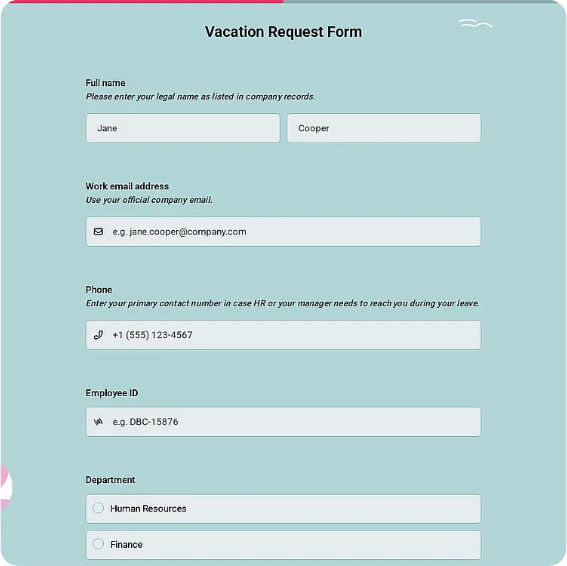
Employee time-off request form with leave type, dates, coverage notes, and manager approval.
Available online on
Download as
- Free PDF and Word downloads for offline use
- Fillable fields you can customize for your business
- Share a link or print copies for in-person sign-ups
- Ready-made online forms on popular form builders
Last updated July 17, 2026. Reviewed by the Online Form Templates team.
About this template
A Time-Off Request Form replaces the hallway ask and the vague calendar invite with a written record of who wants leave, when, and why. Standard fields cover employee name, department, employee ID, leave type such as vacation, sick, or personal, first and last day requested, total days, coverage arrangements, and a manager approval block with signature and date. Small businesses, retail shifts, clinics, and school offices all lean on the same layout.
The point is not bureaucracy; it is fairness and staffing. When every request lands in the same format, managers can compare overlapping dates, check remaining balances, and answer in writing, which protects both sides if a December vacation gets disputed in November.
How teams use this form day to day
In most offices the employee fills out the form as soon as travel plans firm up, notes who will cover their shifts or projects, and drops it with their supervisor. The supervisor checks the team calendar, approves or denies in the office-use section, and returns a copy. HR files the original against the employee's leave balance. Retail and hospitality teams often set a cutoff, such as requests two weeks before the schedule posts, and the date-submitted field enforces it without argument.
Teams running payroll on a biweekly cycle staple approved forms to the timesheet batch, so unpaid leave and PTO deductions are reconciled in the same pass rather than corrected a month later.
Customize fields and branding
The Word download is the master copy: add your company name, adjust leave types to match your policy, and insert your accrual note in the footer, for example that unused days lapse at year end. Some employers add a half-day checkbox; others add a field for remaining balance so the manager confirms it before signing. If you use the online version, conditional logic can hide the sick-note field unless sick leave is selected, and approvals can be forwarded automatically.
Before rollout, have one manager and one employee run a fake request through the process. If the manager cannot decide from the sheet alone, a field is missing, usually coverage.
Common mistakes to avoid
The most common failure is approving time off without recording it anywhere, so two people end up off on the same Friday. Fix that by making the signed form the trigger for a calendar entry, not a substitute for one. Second, avoid free-text leave types; checkboxes keep sick, vacation, and unpaid leave from blending together at payroll time. Finally, always return a copy to the employee, since a request they cannot prove was approved is a conflict waiting to happen.
Example scenario
A dental clinic with six staff uses printed forms kept by the reception desk. A hygienist requests the first week of August, lists a colleague who agreed to swap, and submits it five weeks ahead. The office manager sees another approved request overlapping two of those days, negotiates a one-day shift, signs the amended form, and copies both employees. Payroll processes the PTO from the signed sheet, and the wall calendar is updated the same afternoon.
Choosing PDF, Word, or online
Print the fillable PDF if your team works on site and approvals happen on paper. Keep the Word file for edits when your leave policy changes. Choose the hosted online form when staff are remote or spread across shifts, since requests arrive with timestamps and managers can approve from their phones. Plenty of small businesses start on paper and move online once headcount makes the filing cabinet the bottleneck; the fields stay the same either way.
Typical fields
- Employee name
- Department / role
- Employee ID
- Leave type (vacation / sick / personal)
- First day of leave
- Last day of leave
- Total days requested
- Coverage arrangements
- Date submitted
- Manager approval and signature
Best for
- Small business PTO tracking
- Retail and hospitality shift planning
- Clinic and practice staff scheduling
- School and office admin leave records
When to use PDF vs online
Use the PDF or Word download for in-person sign-ups, fax, or email attachments. Choose an online form when you need automatic notifications, payment integrations, or a shareable link for customers.