 forms.app
Consent & Waiver Form Templates
Medical Consent Form Template
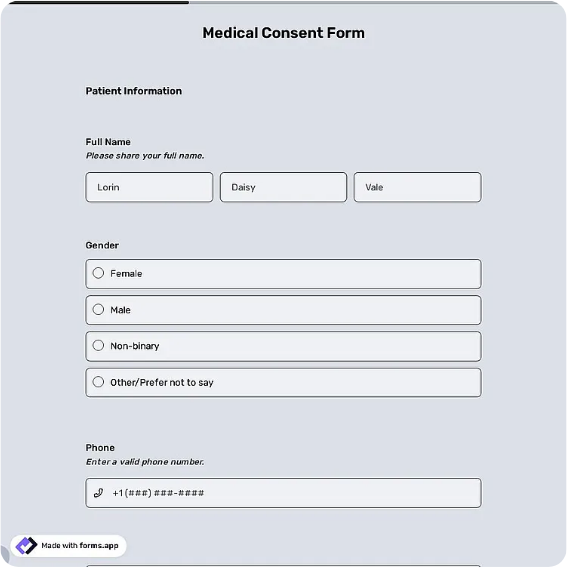
Medical consent form with patient details, allergies, physician and insurance info, and a guardian authorization signature.
Available online on
Download as
- Free PDF and Word downloads for offline use
- Fillable fields you can customize for your business
- Share a link or print copies for in-person sign-ups
- Ready-made online forms on popular form builders
Last updated July 17, 2026. Reviewed by the Online Form Templates team.
About this template
A Medical Consent Form authorizes specified care — routine treatment, emergency care, or medication administration — and puts the information a caregiver needs in one place. Camps, schools, sports leagues, childcare programs, and temporary guardians use it whenever a child or participant will be in someone else's care. Typical fields include patient name, date of birth, parent or guardian name, phone and emergency contact, allergies and current medications, physician name and phone, insurance provider and policy number, the treatment consented to, and a guardian signature with date.
The form does two jobs at once. The consent statement authorizes care so treatment is not delayed while staff try to reach a parent at 2 a.m. from a campsite. The medical details — allergies, medications, physician, insurance — are what an ER intake desk or camp nurse actually asks for first. This is a general-purpose layout, not legal advice; have counsel review the consent wording, and check whether your program's insurer or licensing body requires specific language.
How teams use this form day to day
A summer camp collects the form with registration and files copies in the health office and the trip leader's binder — the binder copy is the one that matters when a camper needs stitches in a town two hours away. School athletic departments keep signed forms for every player so an athletic trainer can act and inform the ER about the athlete's medication in the same minute. Grandparents caring for a child while parents travel abroad carry the form to authorize treatment the pediatrician would otherwise have to delay.
Set an expiry rhythm: collect fresh forms each season or school year so allergies, medications, and insurance details never go stale.
Customize fields and branding
Use the Word (DOCX) download to name your organization in the consent statement, scope the authorization (first aid only, over-the-counter medication, full emergency treatment), and add program-specific lines like dietary restrictions or activity limitations. Programs subject to privacy rules should add a confidentiality note about how forms are stored. The fillable PDF works for registration packets; online versions keep records searchable, though many programs still print a copy for the trip binder because emergencies rarely wait for Wi-Fi.
Common mistakes to avoid
An unsigned or undated form is the classic failure — build a check into registration so nobody is marked complete without the signature block filled. Vague scope is next: "any necessary treatment" alarms some parents while "first aid only" ties staff hands; state the scope you actually intend. Finally, do not let the form be the only copy of critical facts — transcribe severe allergies onto rosters and med lists staff see daily.
Example scenario
A scout troop leaves for a weekend hike with signed forms for all fourteen kids in the leader's pack. One scout has an allergic reaction on Saturday; the leader reads the epinephrine authorization and allergy details off the form, treats immediately, and hands the sheet — physician, insurance, parent contacts — to paramedics on arrival. The parents get the call after care has already started, which is the entire point.
Choosing PDF, Word, or online
This page provides a printable fillable PDF, an editable Word (DOCX) file, and hosted online medical consent forms. The free downloads suit registration packets and trip binders where a paper copy must travel with the group. The online links open ready-made templates on trusted builders when you want typed, legible submissions collected before the season starts. Most programs collect online and print the copies that ride along.
Typical fields
- Patient name
- Date of birth
- Parent / guardian name
- Phone / emergency contact
- Allergies and current medications
- Physician name and phone
- Insurance provider / policy number
- Treatment consented to
- Guardian signature and date
Best for
- Camps and school trips
- Childcare programs
- Youth sports leagues
- Temporary guardians and caregivers
When to use PDF vs online
Use the PDF or Word download for in-person sign-ups, fax, or email attachments. Choose an online form when you need automatic notifications, payment integrations, or a shareable link for customers.